
Build your first hot-reloading component
Build a small Lit app and watch its state survive every edit you make to it. Start here if the plugin is new to you; Installation is the short version for a project you already have. It takes about fifteen minutes and needs Node 20 or newer, an editor, and no knowledge of Vite plugins.
-
Scaffold the app. The Lit and TypeScript template asks no questions.
Terminal window npm create vite@latest my-lit-app -- --template lit-tscd my-lit-appnpm installnpm run devOpen the URL Vite prints.
Check: a page with the Lit and Vite logos and a button reading
Count is 0. Click it and the number goes up. -
Feel the problem. Click the button three times, so it reads
Count is 3. Then rename the label in the starter component.src/my-element.ts part="button">Count is ${this.count}Clicked ${this.count} times</button>Check: the page reloads and the button reads
Clicked 0 times. Your three clicks are gone.Nothing in that module tells Vite it can apply its own update, so the edit walks all the way up to a full page reload.
-
Add the plugin.
Terminal window npm install -D @oddsquad/vite-plugin-litThe template ships without a Vite config, so write one.
vite.config.ts import {defineConfig} from 'vite';import {litPlugin} from '@oddsquad/vite-plugin-lit';export default defineConfig({plugins: [litPlugin({hmr: {indicator: {count: true}}})],});indicator.countputs a running total next to the on-page indicator. Every step below reads it.Register the plugin’s ambient types in the same sitting. TypeScript’s
typesarray replaces its default, so keepvite/clientin the list.tsconfig.json "types": ["vite/client"],"types": ["vite/client", "@oddsquad/vite-plugin-lit/client"],Do it now rather than later: editing
tsconfig.jsonforces a full reload, and from the next step on you have state on the page worth keeping.Stop the dev server and start it again. Vite does not pick up a config file that did not exist when it started.
Terminal window npm run devCheck: a small indicator in the corner of the page, showing a
0.
-
Make the same kind of edit, and keep your clicks. Click the button three times, then rename the label once more.
src/my-element.ts Clicked ${this.count} timesYou clicked ${this.count} timesCheck: the label changes to
You clicked 3 times. The page does not reload, the count stays at 3, and the indicator pulses green and goes from0to1.
That is a hot patch: an edit applied to the running page without a reload.
-
Give it state worth losing. One number is a thin test. Replace
src/my-element.tswith a component that holds a list, a counter and an input.src/my-element.ts import {LitElement, css, html} from 'lit';import {customElement, state} from 'lit/decorators.js';@customElement('my-element')export class MyElement extends LitElement {static styles = css`:host {display: block;max-width: 32rem;margin: 3rem auto;font-family: system-ui, sans-serif;}input:focus {outline: 2px solid currentColor;}`;@state() private count = 0;@state() private notes: string[] = [];private renderHeader() {return html`<h1>Notebook</h1>`;}private renderList() {return html`<ul>${this.notes.map((note) => html`<li>${note}</li>`)}</ul>`;}render() {return html`${this.renderHeader()}<input placeholder="Type a note, press Enter" @keydown=${this.onKey} />${this.renderList()}<button @click=${this.onClick}>Clicked ${this.count} times</button>`;}private onClick() {this.count++;}private onKey(event: KeyboardEvent) {const input = event.target as HTMLInputElement;if (event.key === 'Enter' && input.value) {this.notes = [...this.notes, input.value];input.value = '';}}}declare global {interface HTMLElementTagNameMap {'my-element': MyElement;}}Take the template’s placeholder content out of the page. Leave the
<script>in the head where it is.index.html <body><my-element><h1>Get started</h1></my-element><my-element></my-element></body>Reload the page once.
notesis a new reactive property, and reactive properties get their initial value when an instance is constructed, so the instance already on the page does not have one; a reload starts clean.Add two notes, click the button twice, then type half a third note and leave the caret in the input. Now edit the heading, and nothing else.
src/my-element.ts private renderHeader() {return html`<h1>Notebook</h1>`;return html`<h1>My notes</h1>`;}Check: the heading reads
My notes. Both notes are still listed, the button still readsClicked 2 times, your half-typed third note is still in the input, and the caret is still where you left it.renderHeader()andrenderList()are separatehtmlliterals, and only the header’s text changed. That is template interning: reusing the same template object for identical template text, so Lit sees an unchanged template as unchanged and rebuilds only the header. -
Hot-swap a stylesheet. Write a stylesheet the component can adopt.
src/theme.css .card {list-style: none;margin-bottom: 0.5rem;padding: 0.5rem 0.75rem;border: 2px solid dodgerblue;border-radius: 6px;}Import it with
?css-sheetand put it at the front ofstatic styles. The query hands you aCSSStyleSheetobject, andstatic stylestakes an array, so the component’s own rules stack on top of it. Give each note thecardclass while you are there.src/my-element.ts import {LitElement, css, html} from 'lit';import {customElement, state} from 'lit/decorators.js';import theme from './theme.css?css-sheet';@customElement('my-element')export class MyElement extends LitElement {static styles = [theme,css`:host {display: block;max-width: 32rem;margin: 3rem auto;font-family: system-ui, sans-serif;}input:focus {outline: 2px solid currentColor;}`,];@state() private count = 0;@state() private notes: string[] = [];private renderHeader() {return html`<h1>My notes</h1>`;}private renderList() {return html`<ul>${this.notes.map((note) => html`<li class="card">${note}</li>`)}</ul>`;}render() {return html`${this.renderHeader()}<input placeholder="Type a note, press Enter" @keydown=${this.onKey} />${this.renderList()}<button @click=${this.onClick}>Clicked ${this.count} times</button>`;}private onClick() {this.count++;}private onKey(event: KeyboardEvent) {const input = event.target as HTMLInputElement;if (event.key === 'Enter' && input.value) {this.notes = [...this.notes, input.value];input.value = '';}}}declare global {interface HTMLElementTagNameMap {'my-element': MyElement;}}That is a component edit, so saving it gives you a green pulse and the count goes up. Now change one word in the stylesheet.
src/theme.css border: 2px solid dodgerblue;border: 2px solid tomato;Check: the note borders turn red. The indicator pulses cyan, and the count does not move.
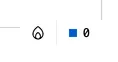
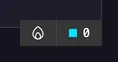
Cyan means a shared stylesheet was swapped in place. One
CSSStyleSheetobject is adopted by every shadow root that imported it, and replacing its rules restyles them all without re-rendering a component. -
See what a reload looks like. Change the page title.
index.html <title>my-lit-app</title><title>My notes</title>Check: the page reloads. The notes are gone, the input is empty, and the indicator is back to
0.index.htmlis not a module, so there is nothing to patch. A few component shapes cannot be patched either, standardaccessordecorators among them. Limitations names each one, what you see when it fires, and what to write instead. If you would rather keep the page up and reload by hand,hmr.onIncompatiblehas a'warn'mode; the HMR guide covers it.
Where next
Section titled “Where next”You have a component whose list, counter, input text and caret ride through every edit, and a stylesheet that restyles the whole app without re-rendering anything. These three pages take it further.